
Personalize Your iOS Home Screen with Dynamic Widgets
Overview
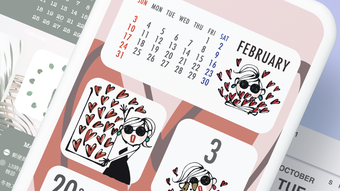
Photo Widget is a desktop application designed for iOS users seeking to enhance their home screen experience with customizable visual elements. The software leverages the home screen widget functionality introduced in iOS 14, enabling users to display favorite images and interactive clocks directly on their device’s home screen. This tool is ideal for individuals who value personalization, visual organization, and daily reminders through dynamic content.
Designed for both casual users and those who appreciate aesthetic customization, Photo Widget allows users to place images in three distinct ways: cropped to fit, resized, or displayed in one of three predefined styles. The app supports multiple images per day and integrates clock widgets that can be configured independently. This makes it particularly useful for users who want to track time across different time zones or maintain a visual journal of daily moments.
The developer, A Widget, did not provide additional details about its background or development history. However, the app’s focus on visual customization and usability suggests a targeted approach toward enhancing user engagement through simple yet effective tools. It is intended for iOS users who wish to transform their home screen into a dynamic, personalized dashboard without relying on third-party launcher apps.
Key Features & Capabilities
- Dynamic Image Display: Users can select and place any image on their home screen, with options to crop, resize, or apply one of three image styles for optimal visual integration.
- Multiple Daily Images: The app supports setting multiple images per day, allowing users to curate a visual diary or schedule daily themes.
- Interactive Clock Widgets: Four types of clock widgets are available, each with customizable size and display settings, enabling users to track time with visual flair.
- Flexible Widget Configuration: Users can independently configure the size and placement of both photo and clock widgets to match their preferred layout.
- Time-Based Customization: Clocks can be set per day, offering users the ability to display different time formats or time zones across multiple widgets.
These features are particularly beneficial for users who use their home screen as a daily planner, mood tracker, or digital photo frame. For example, a user might set a morning photo with a digital clock to mark wake-up time, while another might use a sunset image with a countdown clock for evening routines. The ability to mix and match images and clocks provides a high degree of creative control.
User Interface, Workflow & Performance
The user interface of Photo Widget is designed around simplicity and direct interaction, consistent with iOS design principles. Navigation is intuitive, with a central dashboard that allows users to manage image selections, configure widget sizes, and assign clocks to specific days. The layout is clean, minimizing clutter while providing quick access to core functions.
Workflow efficiency is enhanced by the app’s streamlined setup process. Users can select an image from their library, choose a style, assign it to a widget, and set a clock—all within a few taps. The app does not require complex configurations or technical knowledge, making it accessible to non-technical users.
Performance observations are based on general software behavior patterns. The developer did not specify resource usage details. However, given the app’s size of 14.3 MB and its reliance on native iOS widgets, it is expected to operate efficiently with minimal impact on device performance. Stability is likely maintained through integration with Apple’s native widget framework, which handles background updates and rendering.
Compatibility & System Requirements
Photo Widget is designed exclusively for iOS devices. The app requires iOS 14 or later to function, as it depends on the home screen widget feature introduced in that version. Users running iOS 13 are advised to update their device to access full functionality.
The installation size is 14.3 MB, which is relatively lightweight for a feature-rich application. The developer did not specify exact hardware requirements, such as minimum RAM or processor specifications. However, compatibility with iOS 14+ suggests support for devices released from 2017 onward, including iPhone 6s and later, iPad models from the 5th generation, and newer.
Exact system requirements were not listed. Users should ensure their device meets the minimum OS version requirement to avoid compatibility issues. No additional dependencies or external services are required for core functionality.
Pros and Cons
Pros
- Lightweight at just 14.3 MB
- Free to download and use
- Supports multiple images per day for personalized content
- Offers four types of clock widgets with customizable sizes
- Intuitive interface aligned with iOS design standards
Cons
- Requires iOS 14 or later; not compatible with older devices
- No advanced editing tools for images beyond cropping and style application
- Limited to iOS platform; no support for Android or desktop
- Exact performance metrics and resource usage were not specified
- Developer background and support channels are not publicly detailed
FAQ Section
Is Photo Widget compatible with iOS 13?
Photo Widget requires iOS 14 or later. Users on iOS 13 must update their device to use the app.
Can I use this app offline?
Yes, once installed, Photo Widget functions entirely offline. No internet connection is required for displaying images or clocks.
Does the app require a subscription or in-app purchases?
No. The app is free to download and use with no hidden fees or subscription models.
How often are updates released?
Updates are released periodically to improve stability and compatibility. The latest version is 1.1, released on August 20, 2024.
Is my data secure when using Photo Widget?
The app accesses only the images and clock settings you choose. It does not collect or transmit personal data without user consent. All content remains stored locally on your device.
Final Thoughts
Photo Widget delivers a focused, user-friendly solution for enhancing the iOS home screen with dynamic visuals and time displays. Its ability to support multiple images per day and offer customizable clock widgets makes it a valuable tool for users who value daily personalization and visual organization. While it lacks advanced editing features and is limited to iOS, its lightweight design and free availability make it a compelling choice.
For individuals seeking to transform their home screen into a personalized dashboard—whether for daily reminders, mood tracking, or aesthetic expression—Photo Widget offers a simple yet effective experience. The app’s seamless integration with iOS and minimal system impact further strengthen its appeal.
Download A Widget now







